Home / Buying guides

Monitors · Updated November 8, 2026

Best gaming monitor under $200 (2026)

The monitor is the biggest upgrade for most gamers. Pick by resolution and refresh rate: 1080p at 144 Hz is the cheap starting point, and 1440p at 180 Hz is the sweet spot.

How we pick. These picks come from published reviews by outlets such as RTINGS, Tom's Hardware, PC Gamer, TechRadar and BGR. We have not tested them ourselves yet. Buttons go to Amazon, where you can see today's price and reviews. We earn a commission if you buy.
PickProductTypeAmazon
Best cheap 144 HzMSI PRO MP243L 24-inch 144Hz Monitor24-inch 1080p, 144Hz IPSSee price
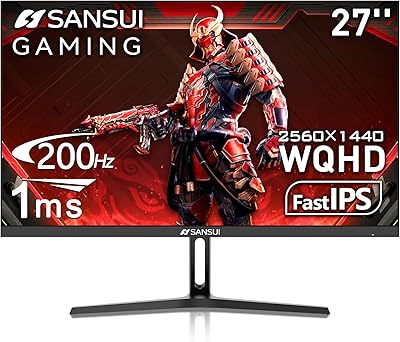
Best 1440p valueSANSUI 27-inch 1440p 180Hz IPS Monitor27-inch 1440p, 180Hz IPSSee price
Best big screenLG 32GS60QC-B UltraGear 32-inch Curved Monitor32-inch 1440p, 180Hz curvedSee price

Price bands are from editor checks in October 2026. Monitor deals move quickly, so tap the button to see the price today before you decide.

Best cheap 144 Hz

MSI PRO MP243L 24-inch 144Hz Monitor

24-inch 1080p, 144Hz IPS

PC Gamer lists it as a budget 1080p pick: a 24-inch IPS panel with a 144 Hz refresh rate and 1 ms response. It is sold as an all-round monitor, not a gaming one, but the specs are there.

Good: 144 Hz on a budget; IPS colors.
Watch for: Small; basic stand.

See price on Amazon
Best 1440p value

SANSUI 27-inch 1440p 180Hz IPS Monitor

27-inch 1440p, 180Hz IPS

A 27-inch 1440p IPS panel running at 180 Hz. It is on our Gear page, and the specs are the draw: sharper than 1080p without a big price jump. We have not found a full review of this exact model yet.

Good: 1440p and 180 Hz; IPS panel.
Watch for: Lesser-known brand; no hands-on review yet.

See price on Amazon
Best big screen

LG 32GS60QC-B UltraGear 32-inch Curved Monitor

32-inch 1440p, 180Hz curved

PC Gamer lists it as a big, sharp and fast pick. It is a 32-inch 1440p panel at 180 Hz with a 1000R curve.

Good: Large; sharp; 180 Hz.
Watch for: The tight curve suits sitting close, less so from farther back.

See price on Amazon

Sources: PC Gamer cheap gaming monitor deals (updated Oct 21, 2026)

How to choose a gaming monitor under $200

A budget gaming monitor is a set of trade-offs between size, sharpness and speed. Knowing which one you care about makes the choice easy.

Size and resolution

A 24-inch 1080p monitor looks sharp at normal desk distance. Stretch 1080p to 27 inches and the picture is visibly softer. A 1440p monitor looks sharper at 27 inches, but it costs more and needs a stronger graphics card to run games at high frame rates.

Refresh rate

A 60 Hz monitor redraws the picture 60 times a second. Faster models, such as 100, 144 or 165 Hz, look smoother in games, but only if your PC can produce that many frames per second. Many monitors start out set to 60 Hz, so after you plug one in, open Windows Settings, then System, then Display, then Advanced display, and pick the highest refresh rate it offers.

Panel type

  • IPS panels have good colors and wide viewing angles.
  • VA panels have higher contrast and deeper blacks but can smear dark moving scenes.
  • TN panels are fast but have weaker colors and viewing angles, and are less common now.

Response time and adaptive sync

A 1 ms response time on the box is usually measured under favorable conditions, so look for reviews that measure it in real use. Adaptive sync (FreeSync, or G-Sync Compatible) matches the monitor's refresh to your frame rate to reduce screen tearing. Check that your graphics card supports it.

Ports and cables

The top refresh rate often works only on certain ports, so check the manual and use the cable in the box. DisplayPort is a safe choice for high refresh rates on a PC.

HDR on a budget

HDR labels on low-cost monitors usually come with limited brightness, so the picture does not look dramatically different. Do not pay extra for it at this price.

Check the stand and the screen on arrival

Look for tilt and height adjustment, or VESA mounting holes if you plan to use an arm. When it arrives, check the screen for dead pixels and uneven backlight while you are still inside the return window.

We pick products from published reviews and say plainly when we have not tested them. You can read how we choose in About SteelGames.

Questions

1080p or 1440p?

1440p is noticeably sharper on a 27-inch screen. On a 24-inch screen 1080p still looks fine and runs on weaker graphics cards.

Does a higher refresh rate help?

Yes, but only if your PC can produce the frames. A 144 to 180 Hz panel is plenty for most budget builds.